Why is my business not showing up on Google?
Find out in two minutes whether you’re missing from Google Maps, Google Search or both, then work through the 13 causes we see most often, with the fix for each.
- First work out where you’re missing: Google Maps, Google Search or both. The fixes are different.
- On Maps, the most common causes are an unverified, suspended or duplicate profile, the wrong main category, and distance from the person searching.
- On Search, a new website can take a few weeks to be found, and one wrong setting can hide it completely.
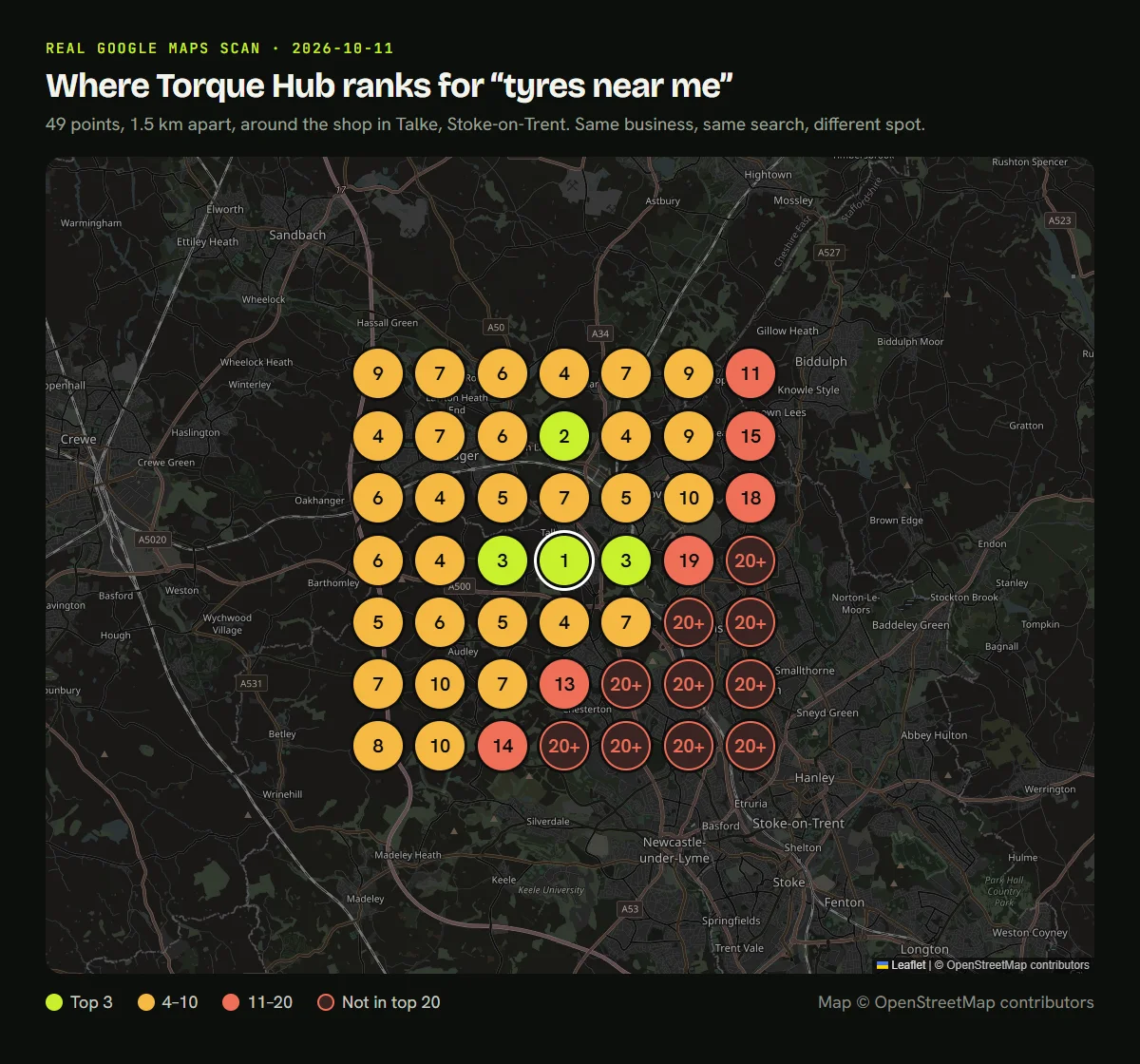
- Our real scan of a tyre shop shows it ranks #1 at its door but is not in the top 20 just 4.5 km away.
If your business isn’t showing up on Google, the cause is usually one of a small number of problems, and most of them can be fixed for free. The trick is knowing which one you have, because a missing Google Maps listing and a missing website need completely different fixes.
This guide gives you a two-minute test to find out where you’re missing, then the 13 causes we see most often when we check UK businesses, with the fix for each.
First, find out where you’re missing
Google shows local businesses in two places: the map results, which come from your Google Business Profile, and the normal search results, which come from your website. Do these three searches on your phone, ideally at your business:
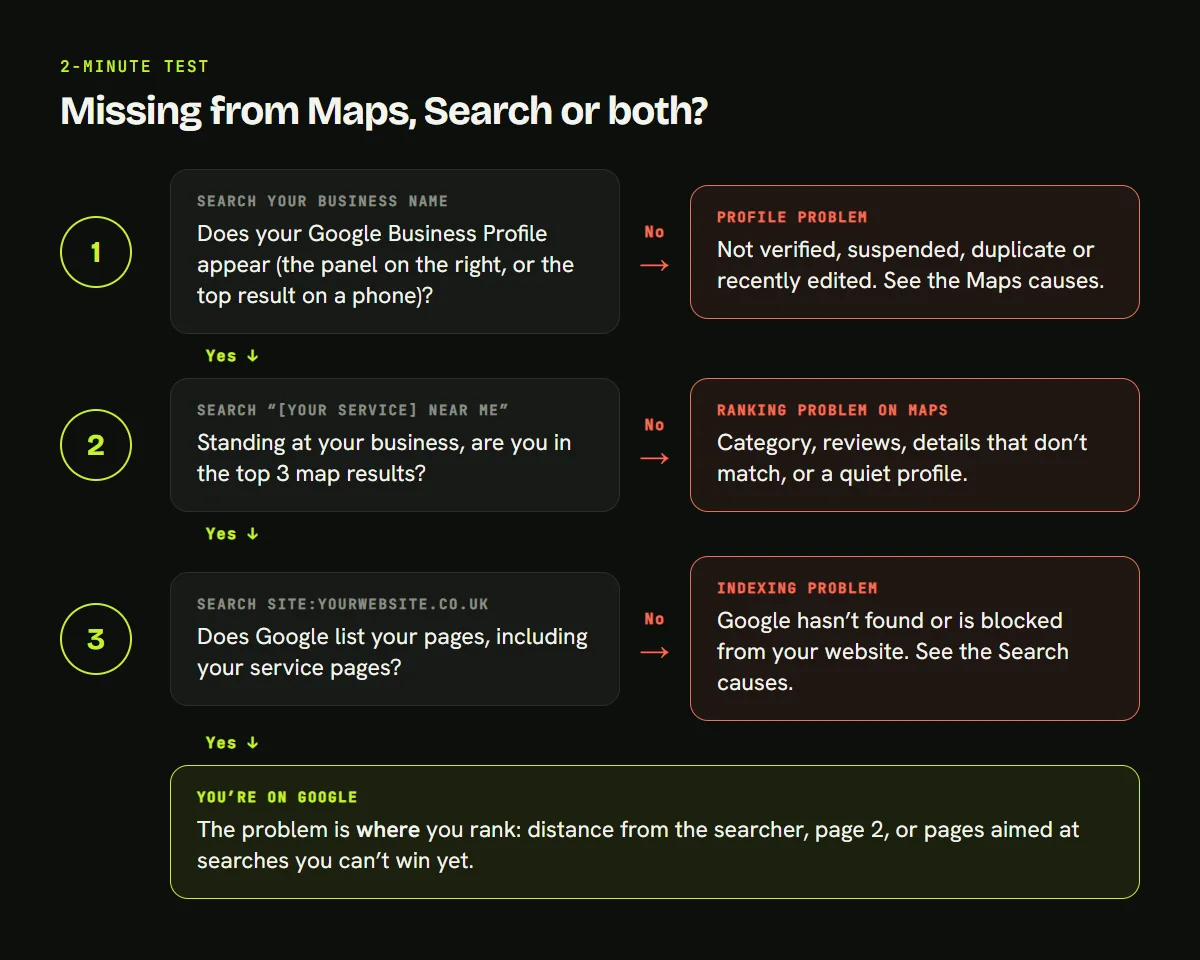
- Search your business name. If your profile doesn’t appear, it is a profile problem (causes 1 to 3).
- Search “[your service] near me”. If you aren’t in the top 3 map results, it is a Maps ranking problem (causes 4 to 9).
- Search site:yourwebsite.co.uk. If no pages are listed, it is a website problem (causes 10 to 13).
Why your business isn’t showing on Google Maps
Google says it ranks local results on three things: relevance (how well your profile matches the search), distance (how far you are from the person searching) and prominence (how well known your business is, including reviews and links). Every cause below damages one of those three.
1. Your profile isn’t verified
Google says verification makes your business “more likely to show up in search results”. Until it’s done, your profile may not appear at all. Check your Business Profile dashboard for a “Verify” button. Google reviews can take up to five business days.
2. Your profile has been suspended
Google suspends profiles that break its guidelines. The usual triggers are extra keywords in the business name (such as “Smith Plumbing Birmingham Emergency 24/7”), a virtual office or PO box as the address, and showing an address when you work at customers’ homes. Fix the problem first, then use Google’s appeal form. You can only appeal once, so add proof such as a utility bill or business registration. Don’t create a new profile: Google tells you not to.
3. There’s a duplicate profile
Google allows one profile per business. Two profiles for the same business split your reviews and confuse Google about which one to show. Search your name and phone number on Google Maps, and ask Google to remove or merge any duplicate.
4. Your main category is wrong
Your primary category tells Google what you are. “Car repair” and “Tyre shop” show for different searches. Choose the category that matches your main service exactly, and add secondary categories only for things you really do.
5. Customers searching are too far away
Distance is the cause business owners miss most, because when you search from your own premises you look fine. We scanned Google Maps from 49 points around Torque Hub, a tyre shop in Stoke-on-Trent that we work with, for “tyres near me”:
| Where the search happened | Torque Hub’s position |
|---|---|
| At the shop | 1st |
| 1.5 km away in any direction | 3rd to 7th |
| Up to 4.5 km away, to the north and west | Mostly 4th to 10th |
| South-east, towards Newcastle-under-Lyme and Stoke | Not in the top 20 (10 of the 49 points) |
Same business, same search, very different results. You can’t change where you are, so the fix is to strengthen the other two factors: relevance and prominence. That means more reviews, consistent listings and website pages for the areas you serve. Our local SEO services start with exactly this kind of scan.
6. Your service-area settings are wrong
If you visit customers rather than having them visit you, Google’s rules say you should hide your address and list the areas you serve. Showing a home address can get you suspended. Set the areas you really cover, and remember Google still ranks you from where you are verified.
7. Your details don’t match across the web
If your name, address or phone number is different on your website, Facebook, Yell or other directories, Google is less sure the information is right. Pick one exact version, down to “Ltd” and “Road” versus “Rd”, and update every listing to match.
8. Competitors have more reviews
Google says more reviews and positive ratings can help your local ranking. Ask every happy customer, with a direct review link sent by text or WhatsApp. Don’t buy reviews or post your own: since April 2025, UK law bans fake reviews and hiding negative ones, and the CMA can fine businesses up to 10% of global turnover.
9. You moved or changed details recently
Google says edits usually show in about 10 minutes but can take up to 30 days, and some are reviewed first. If you’ve just made changes, check for “pending review” edits before changing anything else.
Why your website isn’t showing on Google Search
If the site: search shows nothing, or your service pages are missing, the problem is your website rather than your profile.
10. Google hasn’t found your website yet
Google says it “can take a few weeks” to notice a new site. Speed this up by adding your site to Google Search Console, submitting your sitemap, and getting a few links from places Google already visits, such as your Google Business Profile and directory listings.
11. A setting is blocking Google
One wrong setting can hide a whole website. In WordPress, check Settings, then Reading, and make sure “Discourage search engines from indexing this site” is unticked. Your web designer can also check for a “noindex” tag or a robots.txt rule left over from when the site was being built.
12. You’re there, but on page 2
Very few people click to page 2. In Search Console, open Performance and look for searches where your average position is 11 to 20. Those pages are close, and improving their titles, content and internal links is often the quickest win.
13. Your pages target searches you can’t win yet
A new site trying to rank for “plumber” across the UK will struggle. A page for “emergency plumber in Erdington” is far more winnable. Give each main service and area its own page, and start with specific local searches. See how we do this for SEO in Birmingham.
How long it takes to show up
| What you did | How long Google says it takes |
|---|---|
| Verified a new Business Profile | Reviews take up to 5 business days |
| Edited your profile | Usually about 10 minutes, up to 30 days |
| Launched a new website | A few weeks to be noticed |
| Appealed a suspension | No timeframe given; you’ll get an email |
The 20-minute checklist
| Check | Where | Good result |
|---|---|---|
| Profile status | Business Profile dashboard | Verified, no suspension or pending edits |
| Business name | Your profile | Your real name only, no extra keywords |
| Main category | Your profile | Matches your main service exactly |
| Address or service area | Your profile | Address hidden if you visit customers |
| Duplicates | Google Maps search | Only one profile for your business |
| Name, address, phone | Website and directories | Identical everywhere |
| Reviews | Google Maps | A steady flow of genuine reviews |
| Indexing | site:yourwebsite.co.uk | All main pages listed |
| Blocking settings | WordPress Reading settings | Search engines not discouraged |
| Page 2 searches | Search Console, Performance | A list of pages to improve first |
If you’ve worked through the list and still can’t see the problem, we’ll run a free Google Maps scan of your area and tell you what we find. Based in the West Midlands? See our local SEO in Birmingham.
Sources
- Google: Tips to improve your local ranking on Google
- Google: Verify your business on Google
- Google: Guidelines for representing your business on Google
- Google: Appeal a suspended Business Profile
- Google: Edit your Business Profile
- Google Search Central: Get your website on Google
- CMA: Fake reviews guidance (CMA208)
- Torque Hub map scan: 49-point Google Maps grid for “tyres near me”, 11 October 2026, collected by Axarez.
Frequently asked questions
How do I add my business to Google?
Go to business.google.com, sign in with a Google account and add your business name, category, address or service area, phone number and website. Google then asks you to verify that you run the business, by phone, text, email, video or post. Your profile can show on Google Search and Maps once it is verified.
Why is my website not showing up on Google?
Usually because Google hasn’t found it yet, or a setting is blocking it. Search site:yourwebsite.co.uk to see if any pages are listed. If none are, add the site to Google Search Console and submit your sitemap. Google says a new site can take a few weeks to be noticed.
How do I get my business to show up on Google?
Create and verify a Google Business Profile, choose the most accurate main category, fill in every section, keep your name, address and phone number the same everywhere online, and ask real customers for reviews. Then make sure your website is indexed and has a page for each main service.
Why is my Google Business Profile not showing up?
The most common reasons are that it isn’t verified yet, it has been suspended, there is a duplicate profile, or recent edits are still being reviewed. Check the status in your Business Profile dashboard first. If it is live, search from your own location, because distance changes which businesses Google shows.